FlutterFlow Custom Code Import Errors: Quick Fix Guide
Author:

Gokul Shivappa
Reading Time: 15 minutes
The Problem: Import Recognition Failure
If you're working with FlutterFlow custom actions or widgets, you've likely encountered this frustrating issue: FlutterFlow fails to recognize component imports during compilation, even when the import path appears correct.
This problem occurs because FlutterFlow's code generation system sometimes struggles to automatically resolve import paths for custom components, leading to compilation errors that can halt your development process.
Table of Contents
The Complete Solution
Step 1: Create a Test Page
Step 2: Extract the Import Path Using View Code
Step 3: Implement and Test Your Custom Code
Special Considerations
Why This Method Works
Troubleshooting Common Issues
Conclusion
Key Takeaways
The Complete Solution
Here's a proven method that consistently resolves FlutterFlow import recognition issues:
Step 1: Create a Test Page
First, you need to discover the correct import path that FlutterFlow generates:
Create a new page in your FlutterFlow project (name it "TestPage" for easy identification)
Add the exact component that you want to use in your custom action/widget to this page
Place it anywhere on the page - location doesn't matter since this is just for import discovery
Save the page to ensure FlutterFlow generates the necessary code
Step 2: Extract the Import Path Using View Code
Now you'll discover the correct import path by examining FlutterFlow's generated code:
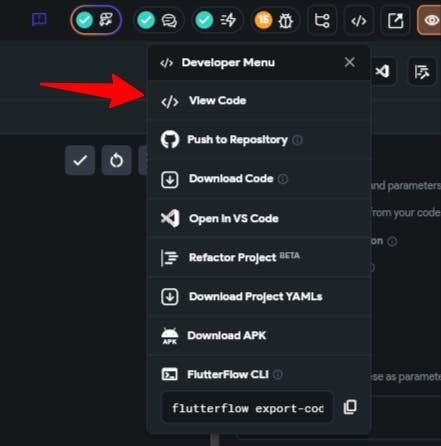
Open the Developer Menu by clicking the developer tools icon
Select "View Code" from the dropdown menu
→ Developer Menu showing the "View Code" option
Navigate to your test page's code in the editor
Look for the import statements at the top of the file (usually lines 1-8)
Copy the exact import line for your component
→ Code editor showing import statements with the component import highlighted
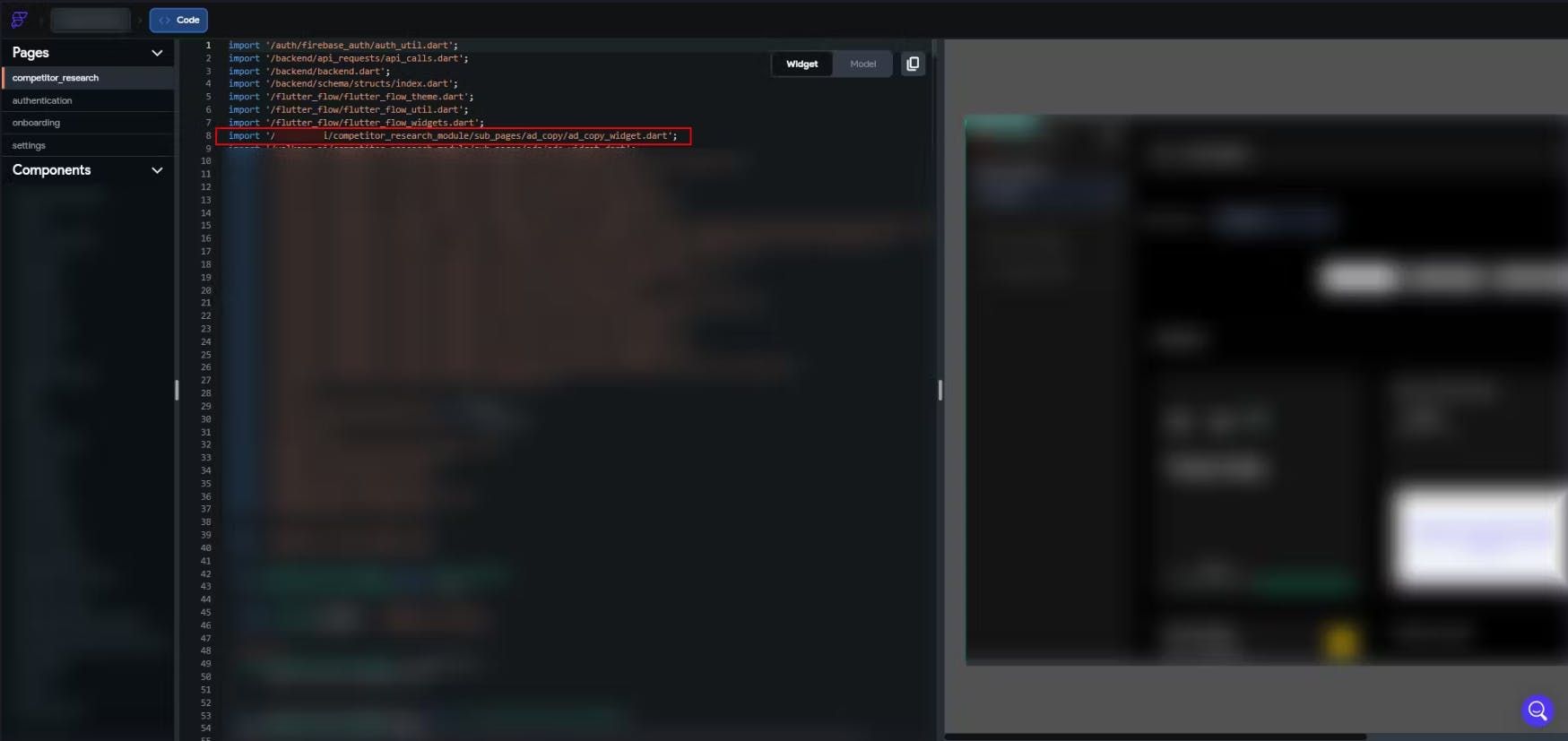
The import path you copy here (like the one shown in the red box) is exactly what you need for your custom code.
Step 3: Implement and Test Your Custom Code
Finally, implement the import in your custom action or widget:
Open your custom action or widget
Paste the copied import statement at the top of your code
Configure your compilation settings for safe testing
→ Action Settings panel showing compilation options
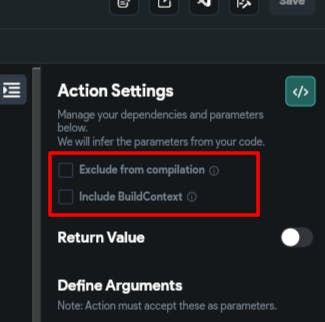
Check "Exclude from compilation" to test without breaking your build
Configure "Include BuildContext" if your component needs it
Test your implementation by running the project locally
Monitor for any compilation errors in the run tab
Once everything works correctly, uncheck "Exclude from compilation" for production use
Special Considerations
DataTypes and Structs
Custom DataTypes and Structs in FlutterFlow don't require explicit import statements. FlutterFlow automatically recognizes them when they're used as:
Parameters in your custom components
Return types in custom actions
Referenced within your custom widget logic
Testing Best Practices
Always use "Exclude from compilation" during development and testing
Keep your test page as a reference for future import discoveries
Test thoroughly before deploying to production
Why This Method Works
This approach works because it leverages FlutterFlow's own code generation system to discover the correct import paths. Instead of guessing or manually constructing paths, you're using the exact imports that FlutterFlow creates when it successfully recognizes and implements your components.
Troubleshooting Common Issues
Import Still Not Working?
Verify you copied the complete import statement including any relative path indicators
Ensure the component hasn't been renamed or moved since creating the test page
BuildContext Errors?
Check "Include BuildContext" in your action settings if your component requires context for navigation or theme access
Runtime Errors?
Confirm the component exists in the specified location and all dependencies are properly configured
Conclusion
The test page method is a reliable solution for resolving FlutterFlow import recognition issues. By creating a dedicated test environment to extract correct import paths, you can ensure your custom actions and widgets integrate seamlessly with your FlutterFlow project.
This systematic approach not only solves immediate import problems but also provides a repeatable process for handling similar issues in future development work.
Key Takeaways
✅ Use test pages to discover correct import paths
✅ Always copy exact import statements from generated code
✅ Configure compilation settings properly during testing
✅ DataTypes/Structs don't require manual imports
✅ Test thoroughly before production deployment